PHPTS 2.0.13 Update: New Event-Triggered Tasks
Released on November 19, 2026, PHPTS 2.0.13 adds the Event-Triggered Tasks module: WebSocket, TCP, MQTT, serial port, and timer event sources are unified through the built-in Rust event gateway, and PHP scripts handle events and reply on the same channel. With the phpts_kv inter-process shared key-value store and the Server → Client push interface, any ordinary PHP page can push messages to online clients, TCP connections, or serial ports. This article covers a three-minute quick start, script conventions, the push loop, timer re-entrancy prevention, and five debugging assistants.
Preface
PHPTS 2.0.13 was officially released on November 19, 2026. Installation package download address: https://down.phpts.com/phpts.zip
Update notes for version 2.0.13 (2026-11-19):
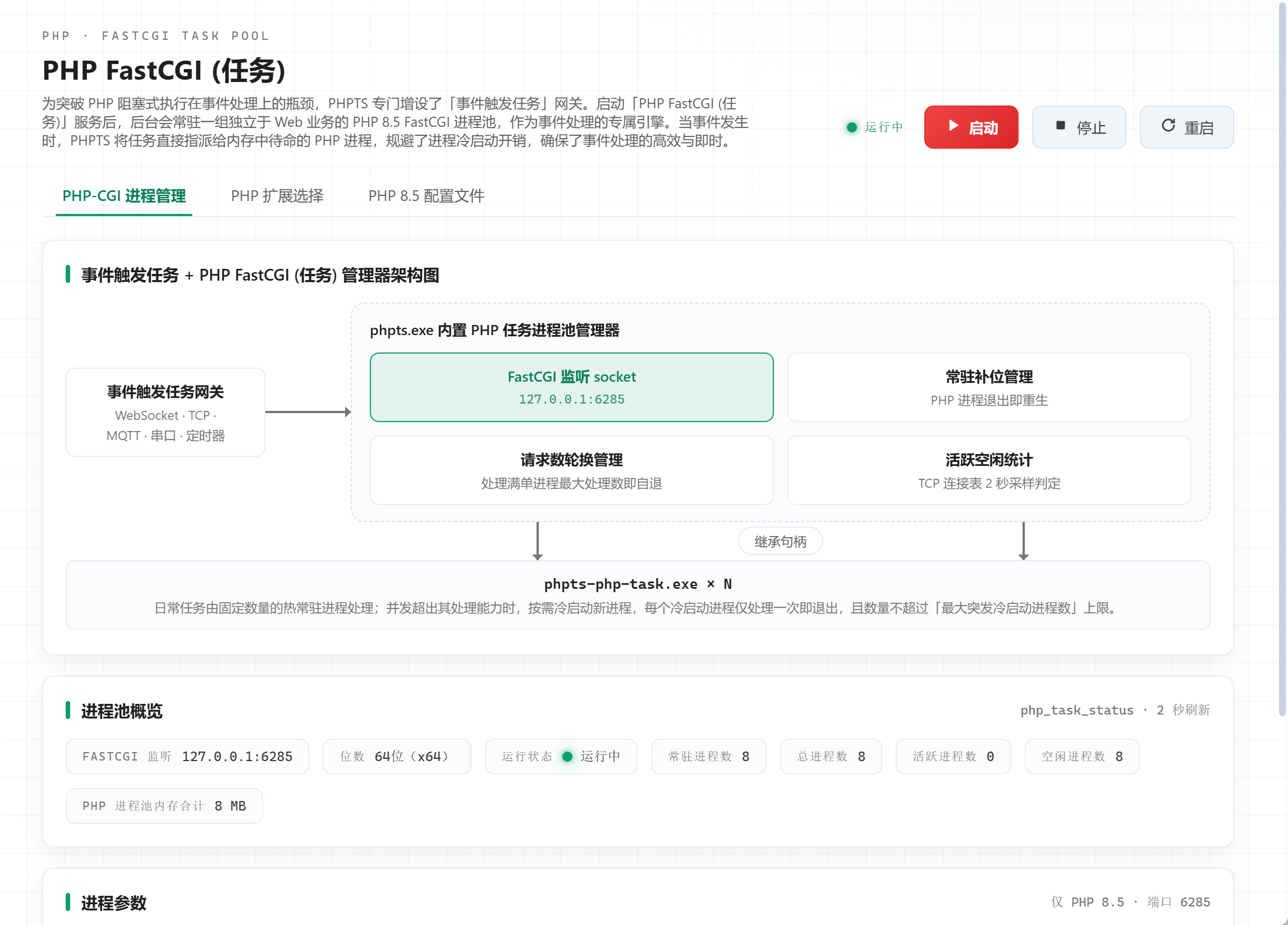
- 1. Added the “PHP FastCGI (Task)” process pool manager, a set of PHP 8.5 FastCGI process pools independent from web services, serving as a dedicated engine for event processing. When an event occurs, PHPTS assigns the task directly to PHP processes waiting in memory, avoiding process cold-start overhead and ensuring efficient and immediate event processing;
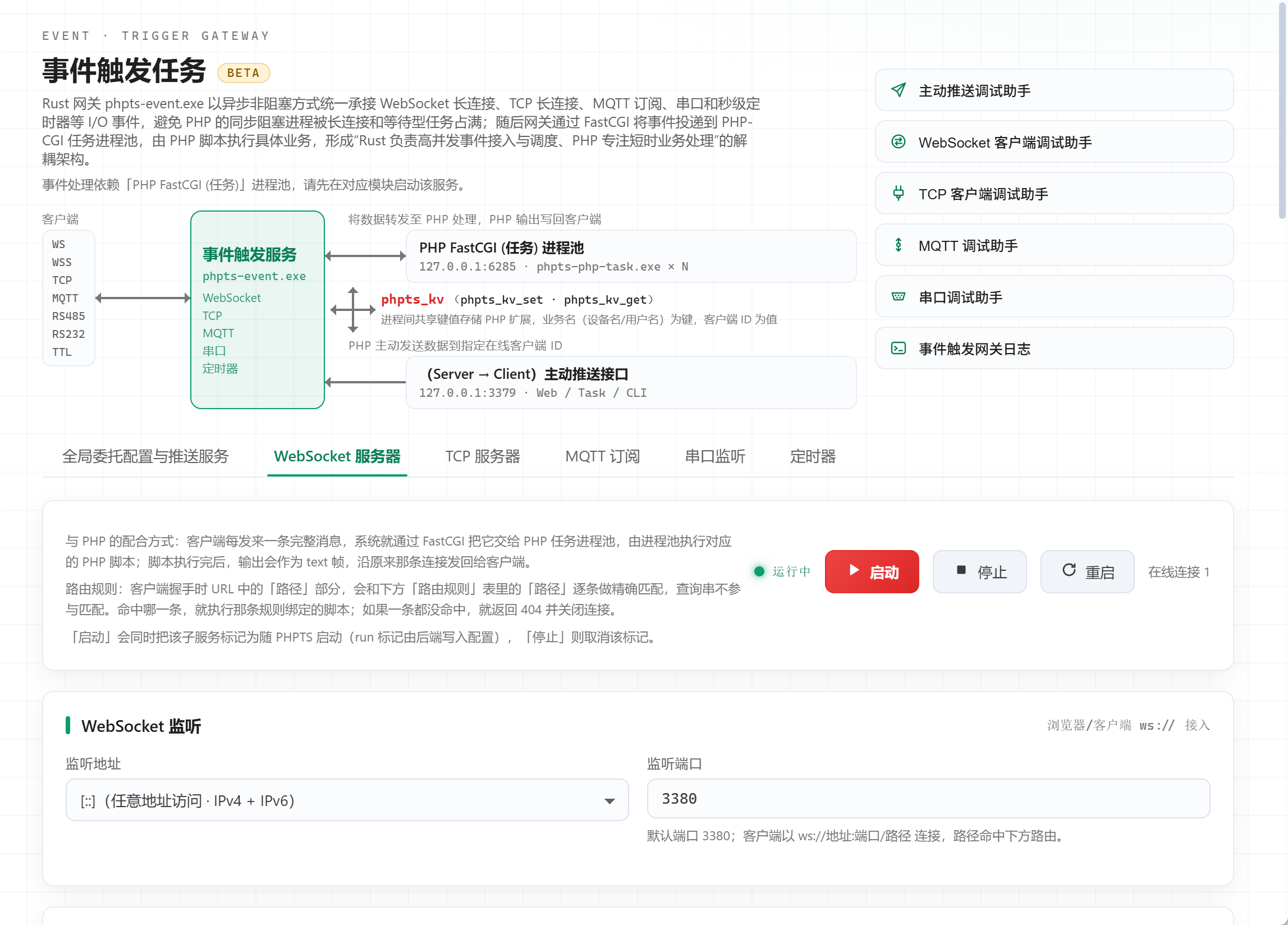
- 2. Added the “Event-Triggered Task” gateway: It uniformly receives I/O events such as WebSocket long connections, TCP long connections, MQTT subscriptions, serial ports, and second-level timers in an asynchronous non-blocking manner using Windows IOCP. The gateway delivers events to the PHP-CGI task process pool through FastCGI, and PHP scripts execute specific business logic, forming a decoupled architecture in which “the Rust gateway handles high-concurrency event access and scheduling, while PHP focuses on short-lived business processing”. Use your familiar PHP scripts to handle each event—no need to write your own socket server, no need to maintain persistent PHP processes; connection management, framing, heartbeat, and TLS are all handled by the built-in Rust event gateway;
- 3. Added the phpts_kv inter-process shared key-value storage PHP extension. Combined with the (Server → Client) proactive push interface, ordinary Nginx + PHP website pages can also push data proactively to specified online WebSocket, TCP clients, or serial ports at any time;
- 4. Optimized CPU usage by removing the breathing light animation and adopting static indicator lights. When the UI has no changes, the CPU usage of the GPU process drops to 0%;
- 5. Replaced the service status indicator lights in the top taskbar with client tool icons. Long mouse press and left/right dragging are supported to change their positions;
- 6. The left-side task list and tool list support long mouse press and up/down dragging to change positions;
- 7. Fixed a BUG where deleting emails from a third-party IMAP client connection in the Electronic Post Office failed;
- 8. Fixed a BUG where large file uploads in the File Transfer Tool were interrupted;
- 9. Fixed a BUG where resetting the root password of the MySQL database failed.
The biggest highlight of this version is the brand-new module “Event-Triggered Task”: It uniformly connects five types of event sources—WebSocket, TCP, MQTT, serial ports, and timers—to PHPTS, using your familiar PHP scripts to handle each event—no need to write your own socket server, no need to maintain persistent PHP processes; connection management, framing, heartbeat, and TLS are all handled by the built-in Rust event gateway.
With the new version of the phpts_kv inter-process shared key-value storage extension and the (Server → Client) proactive push interface, ordinary Nginx + PHP website pages can also proactively push data to online clients, TCP connections, or serial ports at any time. The features and usage are explained clearly below.
I. What Is the Event-Triggered Task
The module is hosted by the independent gateway process phpts-event.exe: long connections and event sources are all held by Rust (WebSocket / TCP uses IOCP asynchronous I/O), and PHP is only a stateless logical execution unit—when an event arrives, the gateway delegates it via the FastCGI protocol to the “PHP FastCGI (Task)” process pool to execute your bound script, and the script output is written back to the client along the original path. An exception in a single sub-service affects only itself and will not drag down the entire gateway.
Five event sources, each with independent Start / Stop / Restart buttons, can start automatically with PHPTS at boot:
- WebSocket Server: Dual listening for ws:// and wss://. TLS certificates can be requested with one click on the page (DNS validation) or deployed with one click from the certificate library; server heartbeat Ping is configurable; routes to different PHP scripts by “Path”.
- TCP Server: Multiple ports listen simultaneously, and each port binds its own script; three framing methods—idle silent merge (default 50ms silent window, configurable), line split by delimiter, and none raw byte segments. Sticky packets and half packets do not need to be handled by yourself.
- MQTT Subscription: Supports + / # wildcard topics and can connect to the built-in NanoMQ or external brokers; rules can configure a “Reply Topic”, and script output is automatically published back.
- Serial Port Monitoring: Supports RS232 / RS485 / TTL device access and multiple serial ports listening simultaneously; baud rate, data bits, stop bits, and parity bits are configurable per port; when “Reply Write Back to Serial Port” is enabled, script output is written back to the device as-is, making host computer reply scenarios ready to use out of the box.
- Timer: Four trigger modes: interval / daily / weekly / monthly, with a “Reentrancy Prevention” switch (skip the current round if the previous round has not finished, enabled by default). Additional parameters are passed to the script via QUERY_STRING.
II. Get Started in Three Minutes
- Open the “Event-Triggered Task” page in the “Tools” group of the sidebar (the overview dashboard also has status cards and an entry). The page has six tabs: “Global Delegation Configuration and Push Service” + five sub-services.
- Click “Add Rule” in the corresponding tab: for WebSocket, enter the path; for TCP, enter the port; for MQTT, enter the topic; for serial ports, select the COM port; for timers, select the trigger mode. The “PHP Script” column is pre-filled by default with demo scripts included in the package (five examples under data/taskdemo/). You can use “Select...” to bind your own script, or click “Edit” to open and modify it directly.
- Click “Start” (it will automatically save the current page configuration before starting or stopping the service). Use the Debug Assistant on the right side of the page header to connect as a client and send a message; you can see the PHP script response returned along the original path.
The script-side conventions are very simple: use php://input to read the event body, $_SERVER['PHPTS_EVENT_*'] to obtain metadata, and echo output as the response. Example (WebSocket routing script):
<?php
// Read the entire message sent by the client (compatible with both JSON and plain text)
$msg  = file_get_contents('php://input');
$data = json_decode($msg, true);
if (json_last_error() !== JSON_ERROR_NONE) { $data = ['text' => $msg]; }

// Use the business name as the key to register the current connection ID in shared memory, so that web pages can proactively push later
if (function_exists('phpts_kv_set')) {
    phpts_kv_set('user:1001', $_SERVER['PHPTS_EVENT_CLIENTID'], 3600);
}

// Client requests exit: output the agreed value, and the gateway actively closes this connection (close 1000)
if (($data['cmd'] ?? '') === 'QUIT') { echo '__PHPTS_CLOSE__'; return; }

// Output is the response: send it back to the client as a text frame over the original connection
echo json_encode(['type' => 'reply', 'msg' => 'received']);
Overview of available metadata:
- PHPTS_EVENT_CLIENTID: Current connection ID (WebSocket / TCP). The client handshake can include ?client_id= to customize the identity; if not included, an ID with the ws- / tcp- prefix is automatically assigned.
- PHPTS_EVENT_CLIENTIP: Client IP (without port), directly usable for access control and audit logs.
- PHPTS_EVENT_PATH / PHPTS_EVENT_NAME: The matched routing path / rule name (rule names support Chinese).
- PHPTS_EVENT_PORT: TCP listening port or serial port name; PHPTS_EVENT_TOPIC: The actual matched MQTT topic.
Two practical conventions: When the output of a WebSocket / TCP script is exactly equal to __PHPTS_CLOSE__, the gateway actively closes the current connection (for unified cleanup in scenarios such as authentication failure or client QUIT); timeouts have two layers, “global + single rule”. A single-rule value of 0 = inherit global (default 300 seconds), and it is linked to the PHP execution time limit of the task pool, so slow scripts will not be cut off midway.
III. Proactive Push: Any PHP Page Can Send Messages to Online Clients
The gateway keeps a persistent HTTP push endpoint (default 127.0.0.1:3379, independently startable/stoppable, and able to set a permission Token), and distinguishes delivery targets by URI prefix: /ws/send (WebSocket text frames), /tcp/send (raw TCP bytes), /serial/send (raw serial port bytes). All three support broadcast and online-list queries. Targeted delivery supports comma-separated multiple IDs, and also supports key= directly passing a phpts_kv key, after which the gateway automatically looks up the key to obtain the ID for delivery.
Typical closed loop: in event scripts, use phpts_kv_set('user:1001', 连接ID) to register (phpts_kv is a cross-process key-value storage extension based on Windows named shared memory, enabled by default for the Web pool and task pool); thereafter any ordinary PHP page or scheduled script can retrieve the ID by key and push; when a client disconnects, the gateway automatically deletes the registration from shared memory, so scripts do not need to handle offline cleanup.
<?php
// Any ordinary PHP page / scheduled script: push based on the registration
$client = phpts_kv_get('user:1001');
if (!$client) { exit('client offline'); }  // Disconnected (the gateway automatically deleted it) or TTL expired
$url = 'http://127.0.0.1:3379/ws/send?client=' . urlencode($client) . '&token=你的权限Token';
$ctx = stream_context_create(['http' => [
    'method'  => 'POST',
    'header'  => "Content-Type: text/plain\r\n",
    'content' => json_encode(['type' => 'notify', 'msg' => 'hello']),
    'timeout' => 3,
]]);
echo file_get_contents($url, false, $ctx);   // {"ok":true}
The command line is equally convenient (the page’s “Global Delegation Configuration and Push Service” tab contains curl examples assembled in real time from the current configuration, which can be copied with one click):
curl -X POST "http://127.0.0.1:3379/ws/send?client=ws-1a2b3c4d&token=你的权限Token" -d "hello"
curl -X POST "http://127.0.0.1:3379/ws/broadcast?token=你的权限Token" -d "系统公告"
curl -X POST "http://127.0.0.1:3379/serial/send?port=COM3" --data-binary "@frame.bin"
IV. Timers: Four Trigger Methods and Reentry Prevention
Timers are no longer limited to the single “interval seconds” form: choose from Interval / Daily / Weekly / Monthly. Daily, weekly, and monthly rules trigger at the local wall-clock time (weekly can select days of the week, and monthly can select dates; February naturally skips nonexistent dates such as the 31st). “Reentry prevention” is configurable per rule: when enabled, a new round is skipped if the previous round has not returned; when disabled, it fires normally at the scheduled time. The script request body is empty, additional parameters are passed via $_GET, and output is written only to the gateway log, making it suitable for background jobs such as heartbeat reporting, expiration cleanup, and daily report generation. After upgrading, the behavior of legacy interval rules remains exactly unchanged.
V. Debugging Assistants and Reliability Details
- Five debugging assistants: active push / WebSocket client / TCP client / MQTT / serial port, opened with one click on the right side of the page header, enabling closed-loop verification of “connect first, then push”; popups can be minimized to the top taskbar, and sessions can be restored at any time.
- Event-triggered gateway logs button: follows the current day’s log in real time (one file per day), so troubleshooting delegation issues does not require browsing directories.
- Port occupation pre-check: before startup, it checks which process is occupying listening ports and names it in the error (including hidden occupation where a socket is bound but not listening); before starting the serial port, it pre-checks for occupation, first recognizing the “Serial Port Debug Assistant” as its own, then evaluating other programs.
- Configuration hot reload: after saving, the gateway reloads immediately, so changing rules does not require restarting the process; Chinese rule names are preserved as-is.
- Process-level isolation: a crash of a single child service only marks it as abnormal and does not bring down the gateway; the start/stop semantics of the gateway and task pool are independent, and the page provides dependency hints.
VI. Other Updates
- Network storage mapping / file transfer large-file upload fix: local proxy PUT reception has been changed to stream-to-disk, so uploads on the order of 17 GB no longer hit the “4 GB memory wall” and fail midway; the upload cancellation path has been supplemented with a regression lock, so cancellation during transfer takes effect immediately.
- Event delegation default timeout has been adjusted from 30 seconds to 300 seconds, giving long-running task scripts more headroom (still overridable globally / per rule).
VII. Upgrade Notes
Simply download the 2.0.13 installer from the official website or upgrade using the built-in update; old configurations remain automatically compatible. “Event-triggered tasks” currently carries a beta label, and feedback on issues and suggestions during use is welcome.
Installer download: https://down.phpts.com/phpts.zip
Comments 1 comments